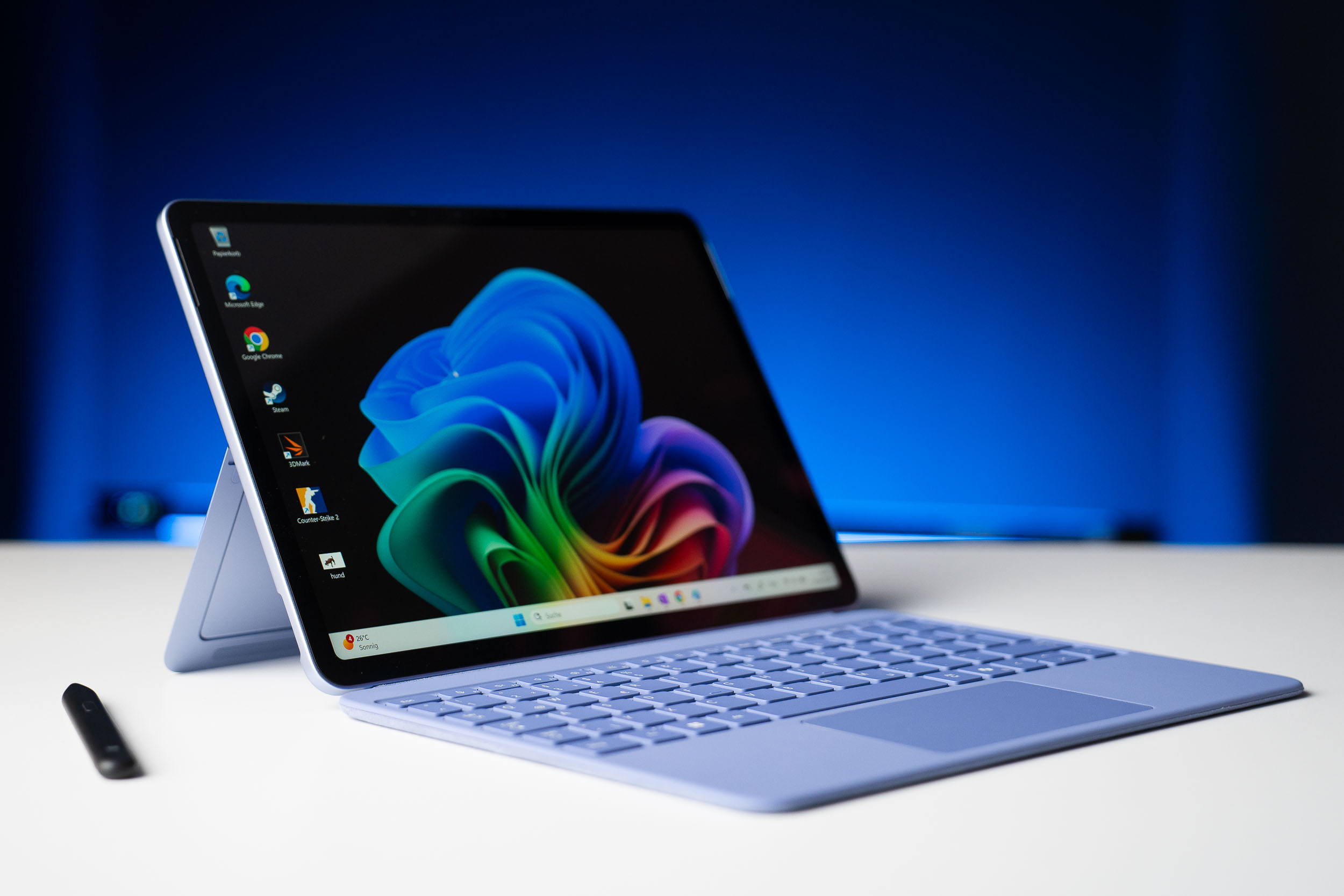
A pocketable Windows PC that runs real desktop apps — keyboard sold separately.
Microsoft Surface Pro (12-inch, 2025)
Microsoft
The only tablet here that runs full Windows desktop software — the pick if you need real apps on the go. The 12-inch LCD is good, battery is strong, and it's genuinely portable. But the ARM chip stumbles on games, and you must add the keyboard and pen to make it work.
The 12-inch Surface Pro is the most tablet-like Surface yet, and the only device in this roundup that runs the full version of Windows. That's the whole pitch: real desktop apps — Photoshop, Premiere, the actual Microsoft Office, proper file management — on a 1.5-pound slate you can hold like an iPad. For people whose work depends on Windows software, nothing else here competes. Microsoft pitches it as a portable, more affordable Surface (a spiritual successor to the Surface Go), and the fundamentals are good. The 12-inch 90Hz LCD is sharp and bright enough for cafes; the Snapdragon X Plus handles office work, dozens of Chrome tabs, and even Photoshop and Premiere (via emulation) smoothly; it's fanless and silent; and battery life is strong — reviewers measured nearly 10 hours of video, well ahead of the iPad Air. Windows is also surprisingly good with touch and the Slim Pen now. The catches are real. It's an ARM chip, so demanding games and some legacy apps struggle. Storage is slower UFS rather than SSD, and there's no headphone jack or microSD. Most importantly, the keyboard, the Slim Pen, and even the charger are all sold separately — so the usable price climbs well past the $799.99 sticker, and Windows still really wants a keyboard and trackpad. Buy it as a featherweight Windows laptop that happens to detach, not as a Netflix-and-games tablet.
$799.99
PickGrade may earn a commission from purchases made through links on this page, at no extra cost to you. This never affects our grades. Full disclosure.
Last reviewed Jun 25, 2026
What we like
- ✓Runs full Windows desktop software — real Photoshop, Premiere, Office, and file management
- ✓Genuinely portable at 1.5 lbs and fanless-silent, with a 12-inch size that's comfortable handheld
- ✓Strong battery life — reviewers measured ~10 hours of video, ahead of the iPad Air
- ✓Excellent kickstand, good keyboard and Slim Pen, and surprisingly solid Windows touch support
Trade-offs
- −ARM chip struggles with demanding games, and some legacy x86 apps run only via emulation
- −Keyboard, Slim Pen, and even the charger are all sold separately — the real price climbs fast
- −Slower UFS storage instead of an upgradable SSD, and no headphone jack or microSD
- −Screen is good but LCD-only (no OLED), and Windows still needs a keyboard and trackpad to shine
Best for
your work depends on real Windows desktop apps and files, and you want the lightest, most portable way to carry them
Avoid if
you want a media-and-games tablet, the best screen and speakers for the price, or an all-in cost without paying extra for the keyboard and pen
Score breakdown
- software8.5/10
- battery8.0/10
- accessories8.0/10
- performance8.0/10
- display7.5/10
- value7.0/10
Specs
- OS
- Windows 11 (Copilot+ PC)
- RAM
- 16GB (24GB option)
- Chip
- Qualcomm Snapdragon X Plus (8-core ARM), Adreno GPU
- Ports
- 2x USB-C (no headphone jack, no microSD)
- Colors
- Platinum, Violet, Ocean
- In box
- USB-C cable only (no charger)
- Stylus
- Surface Slim Pen (sold separately)
- Weight
- 0.78kg (1.5 lbs)
- Battery
- Up to 16h video (claimed); ~10h tested
- Cooling
- Fanless
- Display
- 12-inch PixelSense IPS LCD
- Storage
- 256GB / 512GB / 1TB (UFS, not SSD)
- Keyboard
- Surface Pro Keyboard (sold separately)
- Wireless
- Wi-Fi 7, Bluetooth 5.4
- Thickness
- 7.8mm
- Resolution
- 2196 x 1464
- Refresh rate
- 90Hz
How we know
High confidenceLast checkedReviewers treat the 12-inch Surface Pro as a mid-range, ultra-portable Windows tablet rather than a flagship — Microsoft's clearest iPad rival yet, and a real successor to the Surface Go. The consistent praise: a good 90Hz LCD, silent fanless design, strong battery (MyNextTablet measured 9.65 hours of video, ahead of the iPad Air), and the unique ability to run full Windows apps. The consistent criticisms: the Snapdragon X Plus is fine for productivity but weak for gaming and some legacy apps run via emulation; storage is UFS, not an upgradable SSD; and the keyboard, pen, and charger all cost extra, pushing the usable price well past $799.99. We score it high on software and accessories, lower on value. Specs from Microsoft; assessments reflect Trusted Reviews, MyNextTablet, and 6 Months Later.
Other expert reviews
Video reviews
YouTube — Microsoft Surface Pro 12 Review — 6 Months Later
Owner reviews
No owner reviews yet. Be the first to share what you think.
Write a review
Related guides
All tablets reads →Jun 25, 2026
Five tablet upgrades that aren't worth the money
Tablet makers are very good at getting you to spend more. Here are five upgrades most people pay for and don't need — and what to buy instead.
Jun 25, 2026
The tablet most people should buy in 2026
After ranking tablets from $140 to $1,300, one keeps coming out as the right call for most people. Here's the case for the iPad Air — and the three times you should buy something else.
Was this review useful?