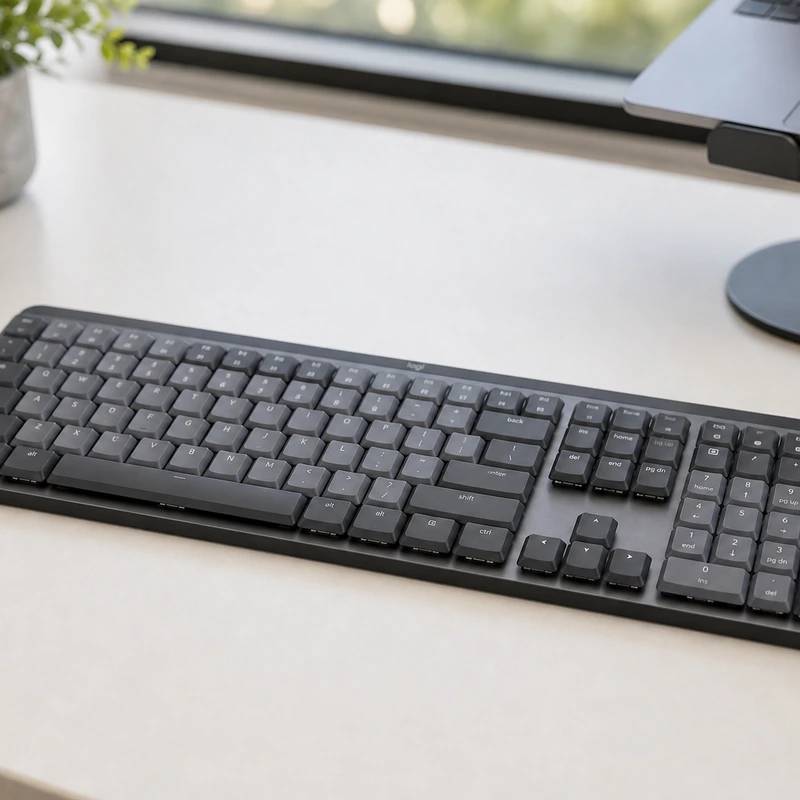
Laptop-low keys, office-quiet, pairs with three machines at once
Logitech MX Mechanical
Reviewed by
Eran Yorkovsky · Founder, PickGrade
The professional's quiet board. Low-profile switches feel light and laptop-familiar, the quiet version won't bother an office, and it pairs with three devices over Bluetooth or Bolt. They aren't hot-swap and the cable only charges, but for desk work it's the easy choice.
The keyboard for a professional desk, not a modding bench. The MX Mechanical takes Logitech's MX workflow, instant switching across three paired devices over Bluetooth or the Bolt receiver, remapping in Logi Options+, and work across every OS, and puts it under low-profile Kailh Choc switches that feel light and familiar coming from a laptop. In the tactile-quiet "brown" version it's genuinely office-friendly, and proximity sensors light the backlight as your hands approach. The limits are clear: switches aren't hot-swappable, the cable only charges (no wired data), the flat ABS keycaps pick up shine, and there's no wrist rest. For clean, quiet, multi-device typing, it's the professional pick.
$159.99
$179.99
Save 11%PickGrade may earn a commission from purchases made through links on this page, at no extra cost to you. This never affects our grades. Full disclosure.
Last reviewed Jun 6, 2026
What we like
- ✓Low-profile typing feel
- ✓Great device switching
- ✓Office-friendly design
Trade-offs
- −Switches are not hot-swappable
- −No wired data mode - the cable only charges
- −Flat ABS keycaps shine and show fingerprints
- −No wrist rest included
Best for
Office and productivity users who want a low-profile wireless mechanical keyboard that feels familiar and keeps noise controlled.
Avoid if
You want a heavy custom board, hot-swap modding, deep switch choice, or the fastest gaming features.
The three lenses
How we grade →- 8.8/10
Value & Longevity · Eran Yorkovsky
Score breakdown
- ease9.1/10
- fit8.9/10
- value8.8/10
- quality8.7/10
Specs
- build
- Aluminum top plate; ABS keycaps
- price
- ~$169
- layout
- Full-size, low-profile
- travel
- 3.2mm; light 43-45g actuation
- battery
- ~15 days (backlit) / ~10 months (off)
- switches
- Kailh Choc V2 low-profile: quiet brown / red / blue (not hot-swap)
- wireless
- Bluetooth or Logi Bolt; 3 devices; no wired data
- backlight
- Proximity + ambient-light auto-adjust
How we know
High confidenceLast checkedThe Logitech MX Mechanical is the quiet-office and value pick: a full-size, low-profile mechanical keyboard built around Logitech's professional MX ecosystem rather than the enthusiast custom scene. It uses low-profile Kailh Choc V2 switches — available in tactile-quiet brown, linear red, or clicky blue — with a slim 3.2mm travel that feels light and laptop-familiar, so it's easy to type fast on and (in the brown 'quiet' version) unobtrusive in shared spaces. An aluminum top plate gives it a premium, professional graphite look, and smart backlighting uses hand-proximity and ambient-light sensors to switch on as your hands approach and dim to save power. Its real strength is workflow: it's fully wireless over Bluetooth or Logitech's Bolt receiver, pairs with three devices and switches between them instantly, and works across Windows, macOS, iOS, iPadOS, Linux, ChromeOS, and Android, with Logi Options+ for remapping. Battery runs about 15 days with the backlight or up to 10 months without. The honest caveats: the switches are not hot-swappable; there's no wired data mode (the cable only charges); the flat ABS keycaps can shine and show fingerprints; and there's no wrist rest. For a clean, quiet, multi-device office keyboard, it's an easy choice.
Compare Logitech MX Mechanical with the top alternates side-by-side.
Compare picks →
Other expert reviews
Video reviews
YouTube — Logitech MX Mechanical Review
From real owners
Human reviews that sharpen our AI grade
No owner reviews yet. Be the first to share what you think.
Own this? Write a review
Related guides
All mechanical keyboard guides →Was this review useful?