MacBook Neo vs Chromebook: Which Cheap Student Laptop Makes Sense?
MacBook Neo vs Chromebook is a question of freedom versus simplicity: a cheap Mac gives you macOS and offline apps; a Chromebook gives you the lowest-friction web laptop.
By Eran Yorkovsky · Founder, PickGrade
June 17, 2026 · Openly AI-powered
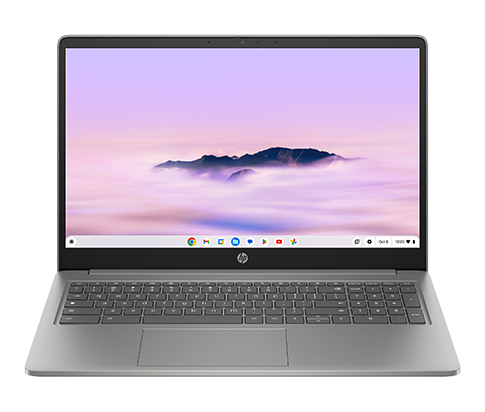
MacBook Neo vs Chromebook is one of the most common budget student-laptop decisions. Both can be affordable. Both can handle basic schoolwork. But they are built around very different assumptions.
A Chromebook is best when almost everything happens in the browser. MacBook Neo is best when you want a cheap student laptop but still want a real macOS computer with broader app support and better long-term flexibility.
For a full shortlist, start with Best Laptop for Students. If your decision is specifically cheap Mac versus Chromebook, this guide is the cleaner path.
The quick answer
Buy a Chromebook if the student mostly uses Google Classroom, Docs, browser tabs, streaming, and school websites — and the lowest price is the priority.
Buy MacBook Neo if you want a more flexible laptop for school, home, light creative work, iPhone integration, offline apps, and longer ownership.
MacBook Neo vs Chromebook at a glance
| Decision | Better pick |
|---|---|
| Lowest upfront price | Chromebook |
| Best Apple ecosystem fit | MacBook Neo |
| Google Classroom basics | Chromebook |
| Offline app flexibility | MacBook Neo |
| Younger students | Chromebook |
| Older students / college | MacBook Neo |
| Better long-term flexibility | MacBook Neo |
| Lowest-risk school-managed device | Chromebook |
Why a Chromebook can be the right answer
Chromebooks are popular in schools because they are simple, inexpensive, and built around the browser. If the student’s world is Google Classroom, Google Docs, web research, school websites, email, and video calls, a Chromebook can be enough.
That makes a Chromebook especially sensible for younger students or families that need the lowest-cost device for homework. It is also easier for schools to manage in bulk, which is why many students already know the interface.
The trade-off is flexibility. A Chromebook is less appealing if you need desktop apps, creative software, local file workflows, or a laptop that can grow with the student into more demanding work.
Why MacBook Neo can be worth it
MacBook Neo is the budget laptop for someone who wants to stay cheap without becoming browser-only. It gives you macOS, more traditional laptop flexibility, Apple ecosystem benefits, and access to a wider range of apps.
That matters as students get older. A middle-schooler writing assignments may be fine on a Chromebook. A high-school or college student may want a laptop that can handle Microsoft Office, creative apps, offline workflows, coding basics, video calls, file management, and personal use without feeling like a school terminal.
MacBook Neo also makes sense for iPhone families. AirDrop, iMessage, iCloud Photos, and Apple account continuity are not must-have features, but they reduce daily friction.
Which is better for school?
For elementary and middle school, Chromebook usually wins on price and simplicity. Many schools build assignments around Google tools, and a low-cost Chromebook is often all the student needs.
For high school and college, MacBook Neo becomes more interesting. The workload can become less predictable, and students may need apps beyond the browser. Neo gives them more room to grow without jumping all the way to a more expensive MacBook Air.
If the student will use the laptop for years, do not only compare today’s homework. Think about next year’s classes, personal projects, and whether the device will become a general computer.
The hidden question: is this only for school?
A Chromebook can be great as a dedicated school machine. But if this laptop will also be used for personal projects, photos, writing, light editing, side work, or family use, MacBook Neo is usually the more flexible choice.
That does not make it the better value for every buyer. It only means the extra money buys a broader computer, not just a school portal.
When to skip both
Skip both if the student needs serious creative work, engineering software, gaming, heavy coding, or a main laptop for the next five years. In those cases, move up to a stronger MacBook Air, a better Windows laptop, or a category-specific pick in the laptop quiz.
Verdict
Choose a Chromebook if you need the cheapest simple school laptop and almost everything is web-based.
Choose MacBook Neo if you want an affordable student laptop that still feels like a real everyday computer.
For most families, the honest split is age and workload: Chromebook for younger students and tightly web-based schoolwork; MacBook Neo for older students, Apple households, and anyone who wants more than a browser.
More laptop buying guides
- See all Laptops
- Best Laptops for College Students
- Best Laptops Under $700
- Best Laptops for Remote Work and Working From Home
- Best Laptops for Programming and Development
- Best Laptops for Video Editing
- MacBook Neo vs MacBook Air
- MacBook Neo vs Budget Windows Laptop
- Best Cheap MacBook for Students
- Best Laptops for Small Business Owners
- Best Budget Laptops for Students and Work
- MacBook Air M5 vs MacBook Pro M5 Pro
- MacBook Air M5 vs Dell XPS 13 (2026)
- Laptop Specs That Actually Matter for Remote Work
Videos and outside scores
- See Apple's MacBook Air page.
- See Google's Chromebook buying guide.
- Read Laptop Mag Chromebook coverage.
Scores use each publisher methodology and should not be treated as directly equivalent.
Still choosing?
- MacBook Neo vs MacBook Air: Which Budget Mac Should You Buy?
- MacBook Neo vs Acer Aspire 5: Cheap Mac or Budget Windows?
- MacBook Neo vs MacBook Air
- MacBook Neo vs Budget Windows Laptop