Buying guide
Best Mechanical Keyboards for Gaming
Reviewed by
Eran Yorkovsky · Founder, PickGrade
The right gaming keyboard isn't the one with the most lighting or the biggest polling-rate number on the box. It's the one whose switch you'll still love in month six, in a layout that gives your mouse room to breathe. Here's how I'd actually spend the money.
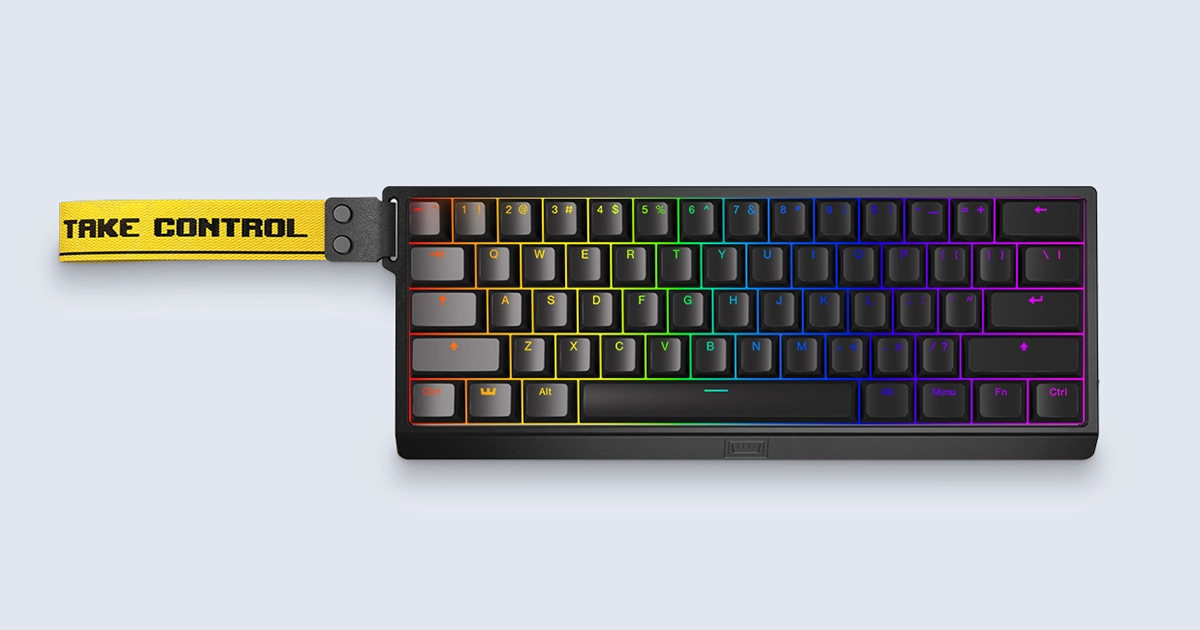 Find your gaming keyboard →
The short answer
If you play competitively, buy the Wooting 60HE+ ($174) and stop reading. Its analog Hall-effect switches (adjustable actuation + rapid trigger) are the real edge, in a 60% body that hands your mouse half the desk. If you want the big loaded desktop board with macros and a volume dial, the Razer BlackWidow V4 Pro ($229) is the one. And if you game and type all day and only want to buy once, the Keychron Q1 Max ($199) does both without asking you to choose.
- Best for competitive FPS: Wooting 60HE+, $174. Analog switches and rapid trigger, a genuine reaction-time edge. The pros' board for a reason.
- Best loaded desktop board: Razer BlackWidow V4 Pro, $229. Eight macro keys, a command dial, full-size and lit to the gills.
- Best game-and-work do-it-all: Keychron Q1 Max, $199. A tank of an aluminum board you can retune by hand; great for both.
- Not a gaming board, and I'll say so: Logitech MX Mechanical, $169. Brilliant for quiet office typing, wrong tool for competitive play (more below).
Quick pick by need
| You want… | The pick | Why |
|---|---|---|
| Best for competitive FPS | Wooting 60HE+ | Hall-effect + rapid trigger: the lowest, most controllable actuation |
| Best mechanical all-rounder | Keychron Q1 Max | 75% hot-swap: the game-and-type balance |
| Most controls / full-size | Razer BlackWidow V4 Pro | Macros, command dial, number pad |
| Quietest for shared rooms | Logitech MX Mechanical | Quiet switches that won't ride your mic |
| Best value in our lineup | Wooting 60HE+ / Logitech MX ($169–174) | The most performance per dollar here |
Buy by behavior, not by RGB
I've spent a decade around this industry, and gaming keyboards are the clearest example of what I started PickGrade to fight: the gap between what a product is and what you're sold. The two specs the box shouts loudest are per-key RGB and the polling-rate war (1000Hz! 4000Hz! 8000Hz!). Both are close to irrelevant to whether you win a round. RGB is jewelry. And above 1000Hz, you're shaving microseconds you cannot perceive and most monitors can't display: a number that exists to be bigger than the last number.
The two things you actually feel every session are the ones marketing is quietest about: the switch under your finger, and whether the board stays planted when you're mashing it in overtime. So here's the PickGrade rule for this category: buy by switch behavior, latency features, layout, software, and build, and whether you also need to type on it. Never by RGB, brand, or "gamer" styling. The rest of this guide is how to do exactly that.
The picks in depth
Wooting 60HE+: the competitive edge that's actually real
Analog Hall-effect switches · adjustable actuation + rapid trigger · 60% layout · wired · $174
Most "gaming" features are marketing. This one isn't. The Wooting 60HE+ uses magnetic Hall-effect switches that sense how far you press, which unlocks two things competitive shooter players genuinely tune for: adjustable actuation (set how deep a keypress registers) and rapid trigger (the key re-fires the instant you lift, so counter-strafing feels instant). It's the closest thing to a legal aimbot for movement, and it's why it keeps showing up under the pros. The trade-offs are honest ones: it's a 60% board, so the arrow keys and function row live under a layer you'll need to learn, and it's wired-first. If you play FPS seriously, none of that will stop you. Buy it.
Razer BlackWidow V4 Pro: the loaded desktop battleship
Full-size · 8 dedicated macro keys · command dial + media controls · full RGB · $229
If your setup is a desk, not a lap, and you play MMOs, sims, or anything macro-heavy, the Razer BlackWidow V4 Pro leans all the way in: eight programmable macro keys down the left flank, a scroll-and-click command dial, a magnetic wrist rest, and RGB you can actually put to work as status lighting. It's big, it's not subtle, and at $229 you're paying for every extra. That's the point: it's for the player who wants the number pad, the controls, and the presence, not the one clearing desk space. Skip it if you play FPS and want your mouse to roam.
Keychron Q1 Max: buy once, game and work
75% layout · gasket-mounted aluminum · hot-swap · wireless (2.4GHz/BT) · QMK/VIA · $199
The Keychron Q1 Max is what I recommend to the person whose keyboard has to do everything: competitive-ish gaming in the evening, a full workday of typing, on one desk. It's a tank: a gasket-mounted aluminum board with a dense, satisfying typing sound out of the box, and because it's hot-swap, you can pull a switch you don't like and drop in another in an afternoon, no soldering, no new keyboard. The 75% layout keeps the arrows and function row you'll want for work while staying compact. It's not the FPS specialist the Wooting is (no analog or rapid trigger), but as a do-it-all it's the smartest $199 here.
Logitech MX Mechanical: the honest exclusion
Low-profile · quiet linear/tactile · multi-device wireless · $169
I'm listing the Logitech MX Mechanical so I can tell you not to buy it for gaming. It's a superb office board (laptop-low keys, quiet, pairs with three machines) but it's tuned for quiet productivity, not low-latency competitive play, and standard Bluetooth is the wrong connection for a ranked match. If your "gaming" is mostly evenings of slower single-player games and most of your day is work, it's defensible. For anything competitive, it's the wrong tool, and I'd rather say that than pad the list.
Competitive vs everyday: match the board to how you play
| How you play | Layout | Switch direction | The pick |
|---|---|---|---|
| Competitive FPS | 60% / compact (mouse room) | Analog Hall-effect + rapid trigger | Wooting 60HE+ |
| MMO / sim / macro-heavy | Full-size | Linear, plus macro keys | Razer BlackWidow V4 Pro |
| Game and work, one desk | 75% / TKL | Tactile or linear (hot-swap to taste) | Keychron Q1 Max |
| Mostly work, some slow games | Low-profile TKL | Quiet linear | Logitech MX Mechanical |
Mechanical vs Hall Effect: which is better for gaming?
Worth clearing up, because it's the real decision now and the marketing blurs it: Hall-effect switches aren't traditional mechanical switches. Mechanical switches (linear, tactile, clicky) register at a fixed point through physical contact. Hall-effect switches are magnetic and analog: they sense exactly how far you press, which is what enables adjustable actuation and rapid trigger.
- Competitive FPS (Valorant, CS2, Apex, Fortnite), and Hall-effect with rapid trigger is the real edge. Instant re-actuation makes counter-strafing and quick taps feel sharper. That's the Wooting 60HE+, and it's why it keeps showing up under the pros.
- Casual play and a lot of typing? A traditional mechanical board is usually the better buy: better value, a wider range of switch feels, and frankly nicer to type on all day. That's the Keychron Q1 Max.
The honest rule: rapid trigger is a competitive tool, not a universal upgrade. If you're not tuning actuation for ranked play, you're paying for a feature you won't feel, and a good mechanical board will serve you better.
Which layout: 60%, 75%, or TKL for gaming?
- 60% (Wooting 60HE+): smallest footprint, most mouse room, best for low-sensitivity FPS. You give up the arrows and function row to a layer you'll learn.
- 75% (Keychron Q1 Max): compact but keeps the arrows and function row; the best all-rounder if you also type and want shortcuts.
- TKL (tenkeyless): the full layout minus the number pad; familiar, and still frees some mouse room. A safe middle ground.
- Full-size (Razer BlackWidow V4 Pro): only if you genuinely use the number pad (MMO macros, sims, spreadsheets). It costs you mouse room.
Rule of thumb: the more competitive your FPS, the smaller you go for mouse room; the more you type, the more you want at least 75%.
The specs that actually decide it
Learn to read these five and you can judge any gaming keyboard, including ones I haven't listed.
- Switch type: linear vs analog. Standard linear switches (smooth, no bump) are the sane gaming default and what most people should buy. Analog Hall-effect switches (the Wooting) add adjustable actuation and rapid trigger: a real competitive edge you'll tune, or a feature you'll never touch. Be honest about which player you are. Clicky switches are fun and loud and almost never the right gaming call.
- Layout and mouse room. This is the sleeper. A 60% or TKL board pulls your mouse hand inboard and frees swing space for low-sensitivity play: it's a performance choice as much as a size one. Full-size only if you truly need the numpad.
- Latency and connection. Wired is the zero-excuses choice. A good 2.4GHz dongle is effectively lag-free and fine for competitive play. Standard Bluetooth is not: great for couch and work, wrong for ranked.
- Build and stability. A board that slides or flexes mid-fight costs you more than any RGB gains you. Weight, feet, and a rigid plate matter; gasket-mounted aluminum (the Q1 Max) is the gold standard.
- Software and hot-swap. Good software (or open QMK/VIA) means your macros and actuation survive. Hot-swap sockets mean one bad switch is a 30-second fix, not a dead board: cheap insurance on a keyboard you'll keep for years.
The panel: two lenses I don't own
PickGrade grades every pick on three lenses, and two of them aren't mine, so I asked my co-editors to weigh in on the ones they own.
Dr. Yocheved Yorkovsky, Health & Environment lens: "The one you should think hardest about is the one nobody markets: noise. A clicky switch is fun for a week, and then it's the thing your housemates and your voice-chat mic resent. For anyone sharing a room, or on a headset for hours, a quiet linear or a silenced switch isn't a downgrade, it's the difference between a setup you can live beside and one you tune out with fatigue."
Michal Zucker, Design & Fit lens: "A 60% board isn't just about mouse room: pulling the mouse in squares your shoulders instead of making you reach around a number pad for eight hours. The players who wreck their wrists are almost always the ones on a full-size board with no palm support. If you play long sessions, buy the compact layout and a wrist rest before you buy the RGB."
Don't overbuy: what to skip
The most common way to waste money here is paying for the specs in the ads. Skip the polling-rate arms race: above 1000Hz you're buying a bigger number, not a better outcome. Skip per-key RGB as a deciding factor; buy it if you like it, never for performance. Skip clicky switches if you share a space or talk on voice; you'll regret the noise. And don't buy the full-size battleship if you play FPS: the numpad you'll never use is actively costing you mouse room. Money saved there goes further in a good mouse or a monitor with real low latency.
Real-desk realities
Things the spec sheet won't tell you, from actually living with these:
- Your mic hears your keyboard. Linear or silenced switches keep your teammates from riding a clacking track all night. This is the most underrated gaming-keyboard decision.
- Wrist over hours. A compact layout plus a palm rest does more for a long session than any feature on the box. Set your desk up for the sixth hour, not the first.
- Cable and desk grip. A board that walks around under fast inputs is a real disadvantage; check the feet and weight, not just the switches.
- Hot-swap is future-proofing. Tastes change and switches wear. A hot-swap board (the Q1 Max) means you retune instead of re-buy: the value play over a multi-year keyboard.
How we picked
No lab, no theater: here's the actual process behind these picks, so you can weigh how much to trust them.
- Specs verified against manufacturer documentation: switch type, actuation, layout, connection, and polling.
- Expert-review consensus synthesized across the outlets that do hands-on testing (PC Gamer, Tom's Guide, RTINGS, and enthusiast measurements): we read the tests so you don't have to.
- Owner complaints scanned for the recurring returns-and-regrets patterns, not just the marketing copy.
- Price and value weighed against what each board actually delivers, and graded on PickGrade's three lenses: Value & Longevity, Design & Fit, and Health & Environment.
- We don't fake hands-on testing. PickGrade doesn't run its own lab and never pretends to. Our edge is buying logic: reading the specs, the independent tests, and the ownership reality against each other, not a review-unit unboxing.
Last updated: July 2026.
Still choosing?
Tell the quiz your main use, layout, switch feel, and budget, and it points you to the board that fits how you actually play, not the one with the loudest spec sheet.
Frequently asked
Are mechanical keyboards better for gaming?
Not automatically. For competitive FPS, a Hall-effect board with rapid trigger (which isn't technically mechanical) has the edge over a traditional mechanical keyboard. For everyone else, casual play plus a lot of typing, a good mechanical board is better value and nicer to type on. Match the board to how you actually play, not to the label.
Are Hall Effect keyboards better than mechanical keyboards for gaming?
For competitive shooters, yes: Hall-effect switches are magnetic and analog, so they enable adjustable actuation and rapid trigger, a genuine reaction-time edge, which is why the Wooting 60HE+ shows up under the pros. For casual gaming and everyday typing, traditional mechanical switches offer better value and a wider range of feels. It comes down to whether you'll actually tune actuation for ranked play.
Is Rapid Trigger worth it?
For Valorant, CS2, Apex, or Fortnite at a competitive level, yes: instant re-actuation sharpens counter-strafing and quick taps. If you play casually or mostly type, it's a feature you'll pay for and never feel, and a standard linear mechanical switch is the smarter buy.
Is 60%, 75%, or TKL best for gaming?
For competitive FPS, 60% or TKL frees the most mouse room for low-sensitivity aim. 75% is the best all-rounder if you also type, since it keeps the arrows and function row. Go full-size only if you genuinely use the number pad: it costs you mouse space you could give your aim.
Wired or wireless for gaming?
Wired is the zero-risk choice. A quality 2.4GHz dongle is effectively lag-free and fine for competitive play. Avoid standard Bluetooth for ranked matches: it is built for convenience, not for the lowest latency.
Is 8,000Hz polling worth it?
In practice, no. Above 1000Hz you are shaving imperceptible microseconds that most monitors cannot even display. It is a spec-sheet number, not a win-rate one; don't pay a premium chasing it.
Which switch type is best for gaming?
Linear switches are the default for their smooth, consistent feel. Analog Hall-effect switches are worth it if you are competitive and will tune them. Avoid clicky switches if you share a room or talk on voice chat: the noise outlasts the novelty.
Do I need per-key RGB?
No. Buy RGB because you like how it looks, never because you think it makes you faster; it doesn't. Treat it as a preference, not a performance feature, and don't let it decide the purchase.
Is a hot-swappable keyboard worth it?
For a board you will keep for years, yes. Hot-swap sockets turn one bad switch into a 30-second fix instead of a dead keyboard, and they let you change the typing feel later without buying new. It is cheap insurance on a long-term purchase.